|
|
||
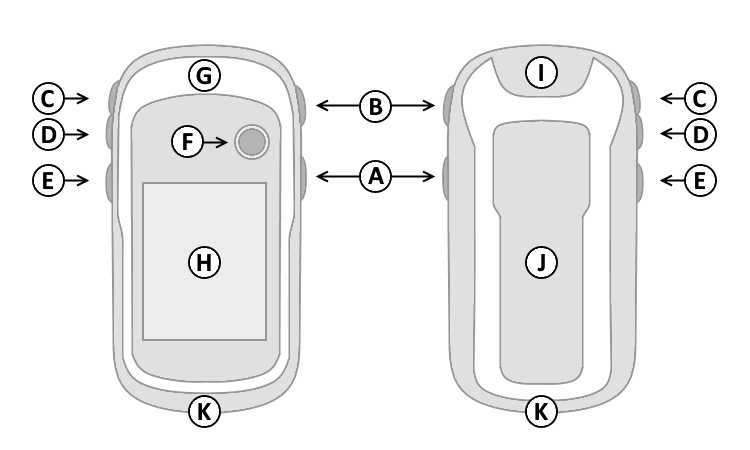
| A. | Power | |
| B. | Back | |
| C. | Up | |
| D. | Down | |
| E. | Menu | |
| F. | Thumb Stick (Enter) | |
| G. | GPS Antenna | |
| H. | Color Display | |
| I. | Power/USB Data Port | |
| J. | Battery Cover | |
| K. | Lanyard Attachment | |
|
|
||
| A. | Power | |
| B. | Back | |
| C. | Up | |
| D. | Down | |
| E. | Menu | |
| F. | Thumb Stick (Enter) | |
| G. | GPS Antenna | |
| H. | Color Display | |
| I. | Power/USB Data Port | |
| J. | Battery Cover | |
| K. | Lanyard Attachment | |
| A. Power Button | D. Down Button | |
| 1. Press and hold to turn unit on/off. | 1. Select page and menu options. | |
| 2. Press and release to cycle the display backlight on/off, then | 2. Zoom In on the Map page. | |
| move Thumb Stick (F) left or right to adjust display brightness. | E. Menu Button | |
| B. Back Button | 1. Press and release to view option menu for active page. | |
| 1. Press and release to loop through display pages. | 2. Press and release twice to view Main Menu. | |
| 2. Press and release to exit/quit a function. | 3. Press and hold to display the Where To? Menu. | |
| C. Up Button | F. Thumb Stick (Enter) | |
| 1. Select page and menu options. | 1. Press and release to confirm data entry or menu selections. | |
| 2. Zoom Out on the Map page. | 2. Press and hold to activate Mark Waypoint page. | |
| 3. Move up, down, right or left to navigate menu selections or pan map arrow. | ||
 |
 |
 |
 |
 |
||||
|---|---|---|---|---|---|---|---|---|
| === |
=== |
=== |
=== |
|||||
 |
 |
 |
 |
 |
||||
|
|
||||||||
 |
 |
 |
 |
 |
||||
 |
 |
 |
 |
 |
||||
 |
 |
 |
 |
 |
||||